
HairLook: AI Hairstyle Try On
Antac S.A.S.Beauty
3.934.00 Reviews
- Version
- 3.0.0
- Installs
- 10.00K
- Age Rating
- Everyone
Screenshots
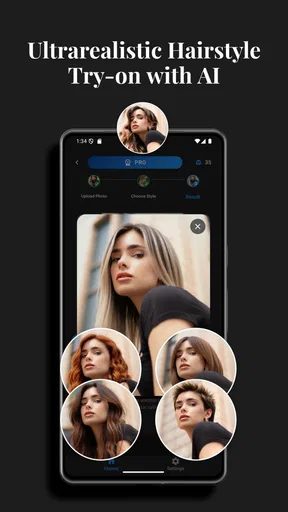
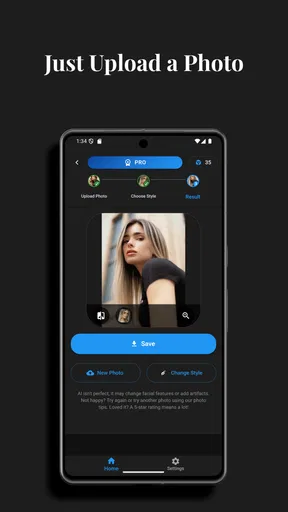
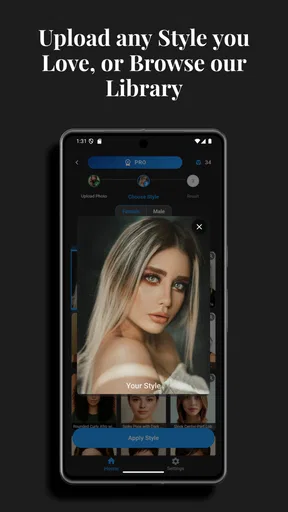
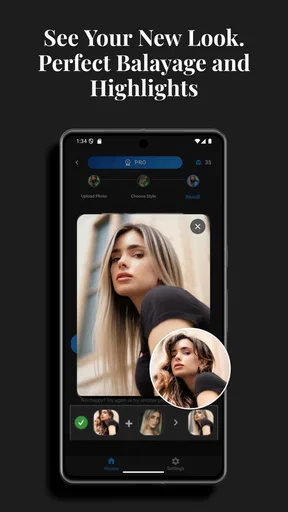
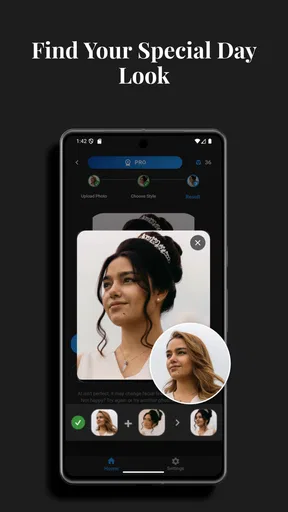
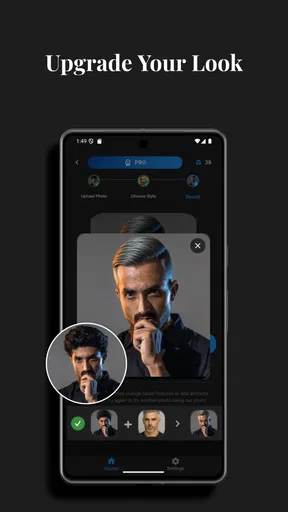
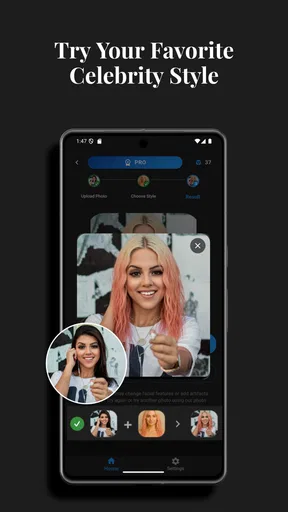
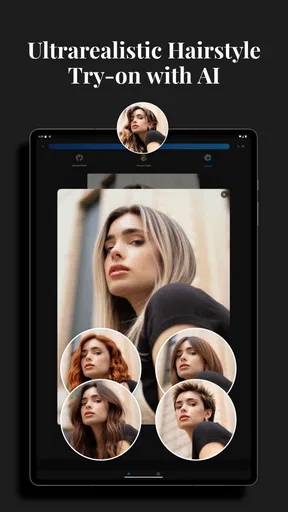
Our Review of HairLook: AI Hairstyle Try On
 Analysis by Appyee
I tried HairLook: AI Hairstyle Try On with one main question in mind: does seeing a possible haircut or color on my own face actually make a salon decision easier? In my experience, that is the app’s most useful idea. It is not trying to replace a stylist or produce a perfect preview of real hair. Instead, it gives you a quick visual conversation starter before you commit to scissors, bleach, highlights, or balayage.
That focus makes it more practical than a general beauty editor. HairLook is a free beauty app from Antac S.A.S., available for Everyone, and its central appeal is the ability to experiment with hairstyles through AI. The current version is 2.8.0, and it runs on devices using Android 7.0 or later. I would describe it as a low-pressure planning tool: useful when I am curious, undecided, or trying to explain a vague idea to another person.
Seeing a hairstyle on your own face changes the decision
The strongest capability here is personal visualization. Looking at a reference photo of a celebrity or model can tell me what a haircut looks like in general, but it does not answer the question I actually care about: how might this direction look with my face, hairline, and overall appearance? HairLook moves that question closer to the screen by applying different hairstyle ideas to a photo.
That distinction matters most for changes that are difficult to describe in words. “Something shorter around the sides,” “warmer highlights,” or “a softer balayage” can mean very different things to different people. A visual mock-up gives me something concrete to react to. I may discover that I like the color family but not the length, or that a dramatic cut feels less appealing once I see it in context.
I found the capability most valuable as a filter rather than a promise. The result should not be read as a guarantee of how a stylist will reproduce the look. Hair texture, density, curl pattern, natural color, lighting, and the shape of an actual cut all affect the final result. Still, a rough preview can prevent an impulsive choice and help narrow down what I want to discuss professionally.
The app covers several kinds of experimentation, including cuts, colors, highlights, and balayage. That range gives it a useful role before an appointment. Someone considering a new fringe can use it differently from someone who is only deciding between subtle warm tones and a more visible color change. The experience is strongest when I already have a question in mind, rather than when I expect the app to invent a complete personal style for me.
What the AI preview is good at
AI styling tools are naturally tempting because they make major changes feel reversible. In a salon, a bad color decision may require correction, and a haircut cannot be instantly undone. In HairLook, I can explore an idea before making that commitment. Even when the image is not perfectly realistic, it can reveal whether the general direction feels exciting, awkward, too bold, or simply not like me.
One less obvious benefit is that comparison becomes easier. Instead of judging one isolated edit and trying to remember it later, I can think in contrasts: a shorter option against a longer one, a restrained color against a stronger transformation, or highlights against an all-over change. That makes the app more useful for decision-making than for creating a single attractive image.
I also think it can improve communication with a stylist, provided I present the image as inspiration. A stylist can see the visual intention and then explain what is realistic for my hair. This is particularly helpful when I struggle with salon vocabulary. The preview becomes a starting point for questions about maintenance, lightening, grow-out, and whether the desired effect suits my natural texture.
The important mindset is to use the image as a conversation tool, not as a technical specification. That one distinction prevents much of the disappointment people can have with AI try-on apps. HairLook can help me choose a direction, but it cannot account for every physical detail involved in creating the finished style.
How I would use it before making a real change
I would begin with a clear, well-lit portrait where the face is easy to see. A cluttered image, a strong filter, or an unusual angle can make any virtual result harder to judge. I would also avoid deciding from one preview. The more dramatic the proposed change, the more valuable it is to compare several variations and look for a consistent preference rather than reacting to one flattering image.
My practical workflow would be simple. First, I would test the general cut without changing too many other elements. Then I would explore color separately. This helps me understand what is attracting me: the shape, the tone, or the combination. If I change everything at once, I may like the overall image without knowing which part I would actually request in a salon.
For color experiments, I would treat the result as a guide to mood and intensity. A virtual shade can look convincing on screen while requiring substantial lightening in real life. I would use the preview to say, “I want this kind of warmth” or “I prefer this level of contrast,” then ask a professional what process would be needed. That is a more realistic use than expecting the displayed color to transfer exactly.
For a cut, I would pay attention to the outline around the face rather than tiny details in the strands. Does the length make the face feel more open? Does the shape look too heavy around the jaw? Does the fringe change the balance in a way I actually like? These broad observations tend to survive the gap between an AI image and a real haircut better than precise expectations about individual hairs.
Another useful habit is to save or show only the few options that genuinely interest me. Bringing a stylist a large collection of contradictory images can create confusion. A smaller selection with a sentence about what I like in each one is more helpful: the length from one preview, the softness of the color from another, or the face-framing effect of a third.
A realistic everyday scenario
Imagine I have a salon appointment on Saturday and have spent weeks considering balayage. I know I do not want a flat, dramatic color change, but I cannot explain how light or blended I want the result. During the week, I use HairLook to compare a restrained version with a more visible one. The previews do not settle the decision completely, but they show me that I prefer a softer transition and less contrast near the face.
At the appointment, I can show the preferred image and explain that the blend matters more to me than copying every detail. The stylist can then adjust the plan based on my existing color and hair condition. In that scenario, the app has done something genuinely useful: it has turned uncertainty into a clearer preference without pretending to perform the salon service itself.
The same process works for a haircut consultation. If I am considering going from long hair to a shorter shape, I can use several previews to identify whether I am comfortable with the change around my cheeks and jaw. If every shorter option feels wrong, that is valuable information too. The app can prevent me from confusing admiration for a style with a real desire to wear it.
Where the experience has limits
The main trade-off is the unavoidable gap between a digital simulation and physical hair. Hair does not sit like a flat graphic. Waves spring back, curls occupy space, fine hair may not hold a shape, and thick hair can behave very differently from a generated preview. Color is equally complicated because the starting shade and previous treatments affect what a professional can achieve.
That means HairLook is less suitable for anyone who wants a precise technical forecast. If I need to know the exact maintenance schedule, the number of salon visits, or whether a particular bleach process is safe for my hair, this app cannot answer those questions. A consultation with a qualified stylist is the better option for those decisions.
There is also a psychological limitation. A polished preview can make a transformation feel easier than it will be in real life. A new color may require upkeep, and a cut that looks appealing from the front may need daily styling. I would not use the app alone to make a decision involving a major chemical treatment. I would use it to identify the look, then investigate the practical cost and care involved.
The free entry point is welcome, but some users may encounter in-app purchases priced from $6.99 to $9.99 per item. That makes it important to think about how seriously I plan to use the app before paying for anything. If I only want a quick idea for one appointment, the free experience may be enough depending on what I need. If I enjoy repeated experimentation, I should judge the value by whether the additional options genuinely improve my decision rather than encouraging endless browsing.
The app has a 4.0 average from around 482 ratings, with roughly 26 written reviews, and has passed 10 thousand installs. Those figures suggest a modest but established audience rather than a universally dominant beauty platform. I would take that as a reason to approach it with sensible expectations: it is a focused tool for visual experimentation, not a complete hair-care system or a substitute for professional advice.
Small choices that make the previews more useful
One practical tip is to test the same hairstyle idea with more than one photo when possible. A result that only looks good from one angle may not reflect how I feel about the style overall. Comparing a straightforward portrait with a slightly different expression or angle can expose whether I like the actual change or merely the mood of one image.
A second tip is to separate inspiration from feasibility. I would keep two notes after experimenting: what I like visually and what I need to ask a stylist. The first might say “soft brightness around the face.” The second might ask whether my current color can reach that result, how often it needs refreshing, and what happens as it grows out. This turns the app into preparation rather than a source of unrealistic certainty.
A third insight is that the best preview may be the one that rules out an idea. Beauty apps often encourage users to chase the most dramatic transformation, but a rejected look can save time, money, and regret. If a style repeatedly feels unlike me across several previews, I can stop treating it as a serious option. That is a quiet but meaningful benefit of visual testing.
I would also avoid comparing previews solely by attractiveness. A style can look striking in an image while being inconvenient for my routine. I would ask myself whether I am willing to style it, maintain the color, and live with the grow-out. HairLook helps with the first emotional reaction; my daily habits must answer the rest.
Who will get the most from HairLook?
This app is a good fit for someone who is curious but undecided. It suits people preparing for a salon visit, considering a noticeable change, or trying to explain a hairstyle to a friend or professional. It is especially helpful when the barrier is imagination: I know I want something different, but I cannot picture how a cut or color might change my overall appearance.
It can also help people who prefer gradual decisions. Instead of jumping from a familiar look to the most dramatic option, I can compare a series of increasingly bold directions. That makes the app useful for planning a controlled change, such as moving toward lighter pieces or a shorter shape without committing immediately to the most extreme version.
I would recommend skipping it if I am looking for hair-care education, personalized treatment advice, or an exact preview of a finished salon result. It is also not the right tool if I dislike photo-based experimentation or would find an imperfect simulation more confusing than helpful. In those cases, a stylist consultation, physical wig try-on, or direct discussion of reference photos may be better.
People who already know exactly what they want may not gain much from repeated AI previews. The real value is in exploration and communication. If my decision is already made, the time may be better spent discussing technique, upkeep, and suitability with a professional.
My final take on this focused beauty tool
HairLook works best when I treat it as a visual rehearsal for a real hairstyle decision. Its AI try-on capability can make vague ideas easier to compare, and it gives me a practical way to discover what I like before making a lasting change. The most useful outcome is not a perfect image; it is a clearer conversation about the direction I want.
I like that the app lowers the emotional risk of experimenting with cuts, colors, highlights, and balayage. At the same time, I would keep its limitations in view. The preview cannot reproduce my exact texture, the technical demands of coloring, or the maintenance of a real style. Paid items may also affect how worthwhile it feels for occasional users.
Overall, I would recommend it to anyone standing between “I want a change” and “I do not know what change.” I would use it before an appointment, compare a few thoughtful options, and take the strongest ideas to a stylist for a reality check. That is where this free beauty app earns its place: not by replacing expertise, but by helping me arrive with a more specific and confident idea.
For me, HairLook: AI Hairstyle Try On is most valuable when it turns hesitation into a shortlist. If that is the problem I am trying to solve, it is worth trying. If I need exact technical guidance or a guaranteed result, I would choose a professional consultation instead.
Privacy and Permissions
See what permissions an app requests and how it handles your data.
- Photos/Media/Files
- read the contents of your USB storage, modify or delete the contents of your USB storage
- Storage
- read the contents of your USB storage, modify or delete the contents of your USB storage
- Camera
- take pictures and videos
- Other
- view network connections, full network access, Google Play license check, read Google service configuration
Verdict
Strengths of HairLook: AI Hairstyle Try On
- Offers many hairstyle previews before visiting a salon.
- Useful for comparing short, long, curly, and straight looks.
- Simple interface makes experimenting quick for first-time users.
- Can inspire hairstyle ideas when you are unsure what to choose.
- Virtual previews are convenient and available whenever you need them.
Limitations of HairLook: AI Hairstyle Try On
- Results may look unrealistic with poor lighting or low-quality photos.
- Some styles or features may require a subscription or in-app purchase.
- AI predictions cannot accurately show every hair texture or face shape.
- Uploaded selfies may raise privacy concerns depending on data policies.
- The app does not replace professional advice about cuts or hair health.
Similar Picks in This Category
View All
Beauty Makeup Editor & Camera
Photo & Video Editors - Instant Solution4.7

Perfect365: Face Makeup Editor
Perfect365, Inc.3.5

Mirror Plus - HD Mirror app
Digitalchemy, LLC4.8

Cute Lock Screen & Wallpapers
Prometheus Interactive LLC4.6

HD Camera for Android
One Music Player4.5

Phone Mirror app - True Mirror
Cards4.6
Frequently Asked Questions
What is HairLook: AI Hairstyle Try On, and how does it work?
HairLook: AI Hairstyle Try On is an image-based beauty app that lets you preview different hairstyles using artificial intelligence. After selecting or taking a photo, you can explore hairstyle ideas and see how they may look on your face. The result is intended as a visual simulation rather than a guaranteed representation of an actual haircut, color, texture, or salon result.
Do I need to upload a photo to use HairLook?
Most of the app’s main features require a portrait photo so the AI can apply hairstyles to your appearance. For the best results, use a clear, front-facing image with good lighting and minimal obstruction from hats, hands, or heavy shadows. Depending on the version, you may be able to take a new picture or choose one from your device’s gallery.
Is HairLook: AI Hairstyle Try On free to download and use?
HairLook may be available to download at no initial cost, but some hairstyles, advanced AI effects, exports, or other tools can be restricted behind in-app purchases or a subscription. Pricing and available features may vary by platform, country, and app version. Before confirming a trial or payment, carefully review the store listing and subscription terms.
Can HairLook accurately show how a hairstyle will look in real life?
The app is useful for inspiration, but its previews should not be treated as an exact prediction. AI-generated results can be affected by lighting, image quality, hair length, facial angle, hair texture, and the selected style. A hairstyle may appear more polished or symmetrical in the preview than it would in reality, so it is best to show the result to a professional stylist.
Are my photos and personal data safe when using HairLook?
Before uploading personal photos, review HairLook’s privacy policy and the permissions requested by the app. Image processing may take place on the device or through online servers, depending on the feature and version. Avoid using photos that include other people without permission, and check how long images are stored, whether they are used to improve services, and how you can request deletion.
